top of page

The App Simplifying Probate Inventories

Easily Create the Inventory for Probate

The Home Inventory Platform That Provides Easy Documentation

imageprobate.png
If you’re settling an estate, a probate inventory is often one of the most time-consuming requirements. Executors and families must identify and document a decedent’s assets—especially tangible personal property—in a way that’s organized, defensible, and easy to share with attorneys, heirs, and the court.
 
SaveOr helps you build a probate-ready inventory faster by capturing items with photos, organizing them by room/category, and generating structured reports you can share with all stakeholders.

A probate inventory is a legally required list of a deceased person’s assets filed with the court during estate administration. It must detail all probate assets and their fair-market values so the executor can settle the estate accurately and transparently.

How SaveOr Helps You Create a Probate Inventory

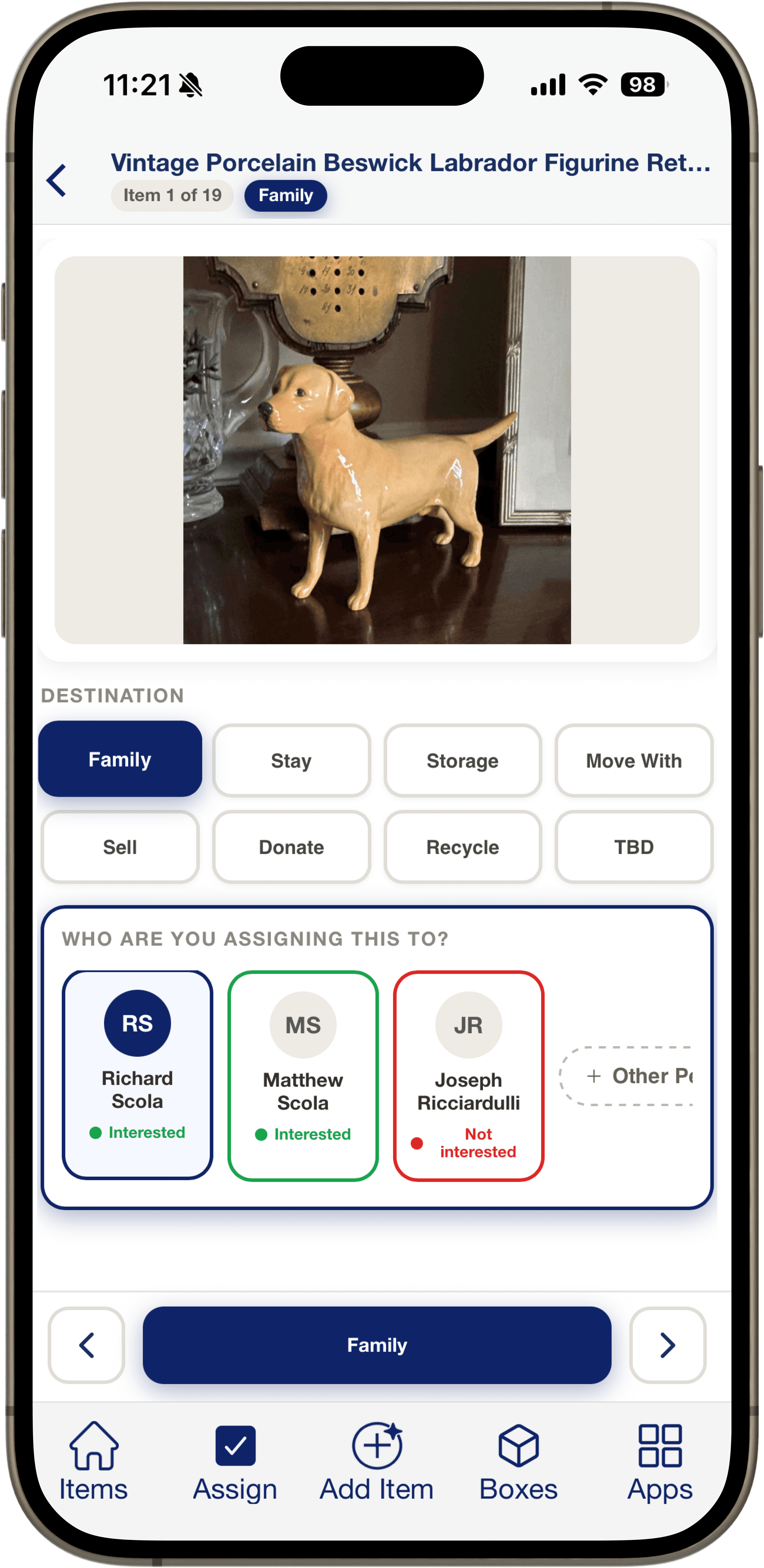
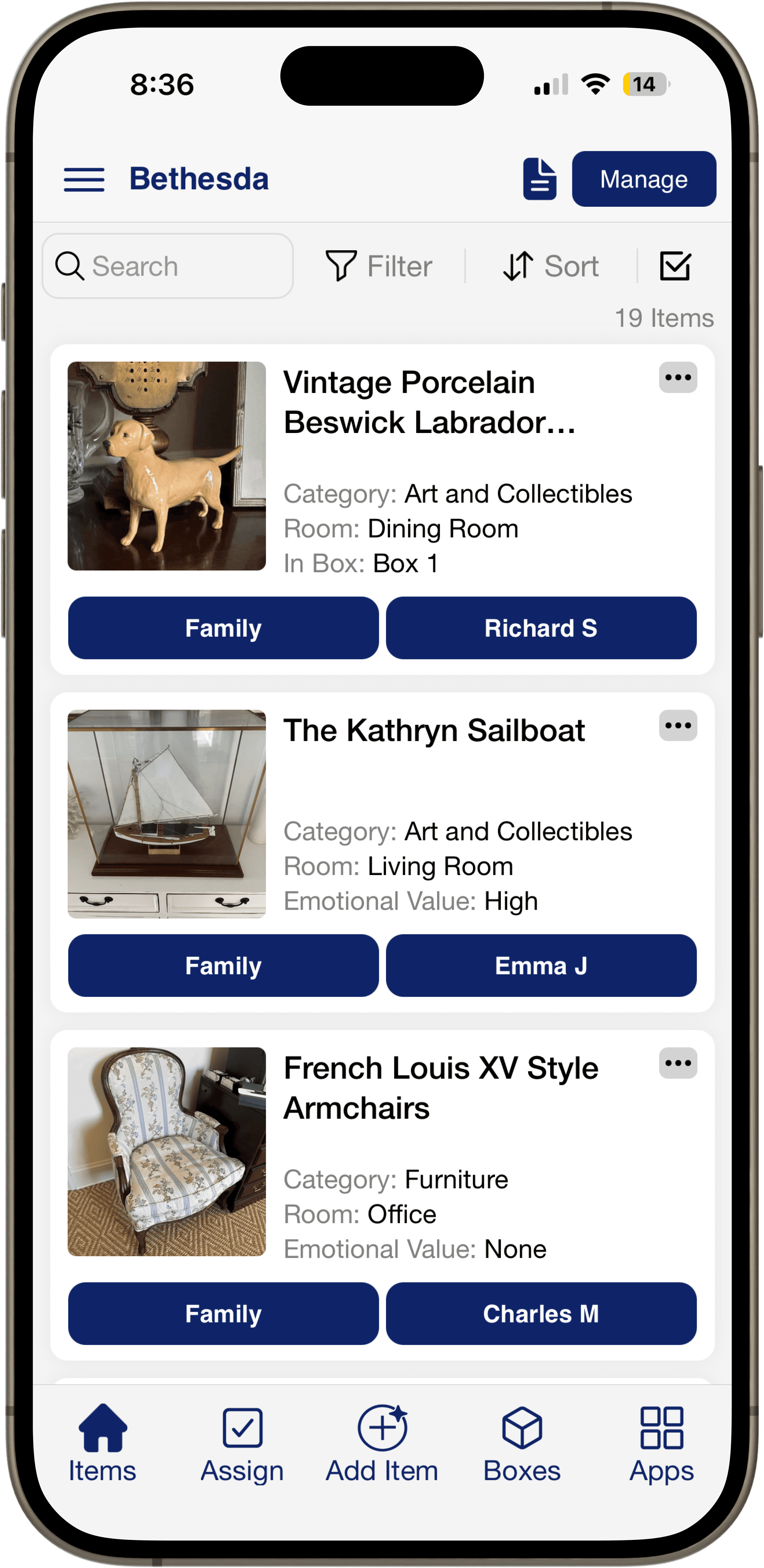
1) Capture items quickly with photos

  • Add items room-by-room and let the inventory build itself as you go, no spreadsheets required.

2) Keep heirs aligned​

  • Share access with family members so everyone can review items, request keeps, and stay on the same page.

3) Document values responsibly

  • If you need valuations, you can add estimated values, notes, and supporting details for appraisal coordination.

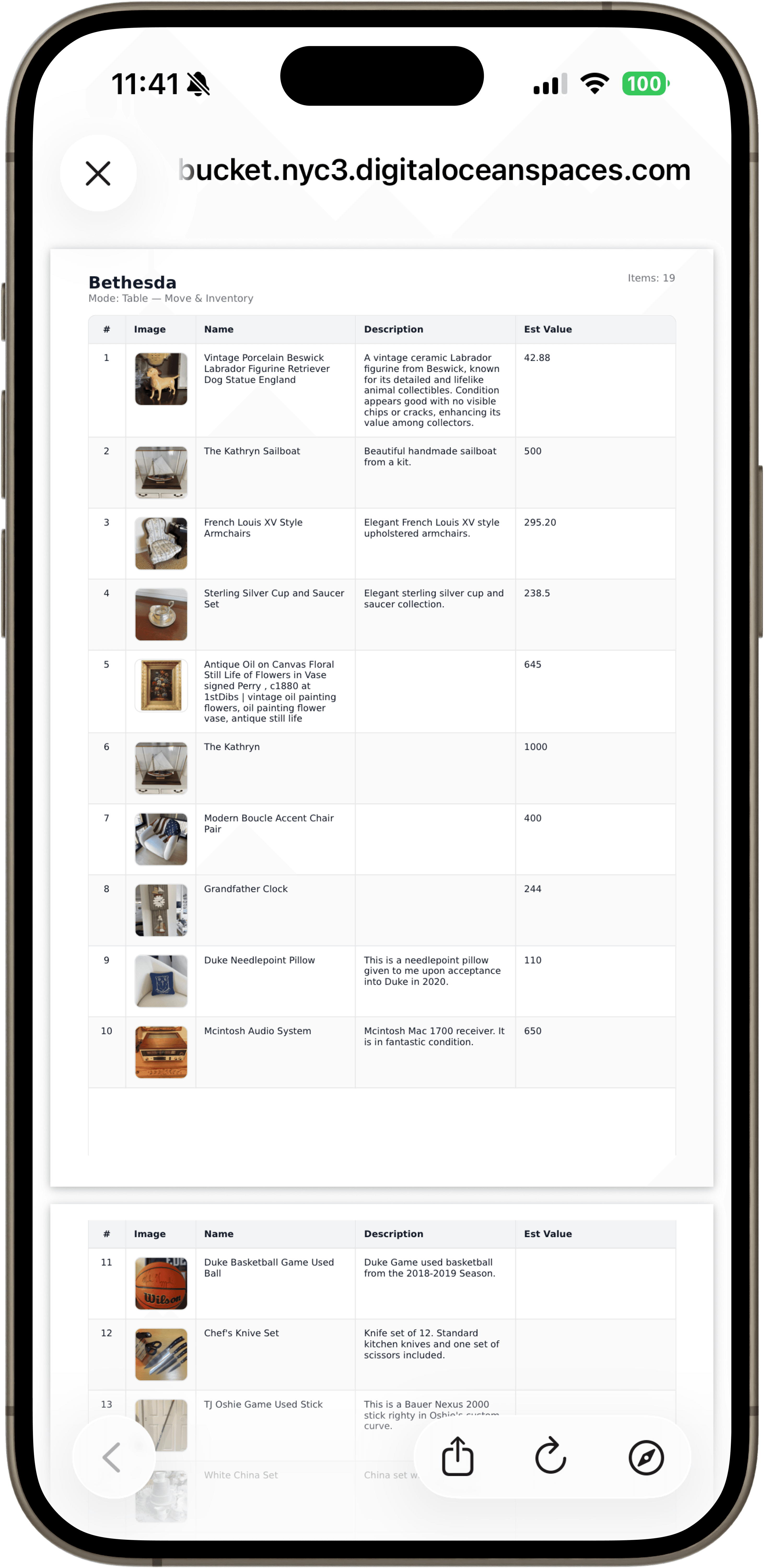
4) Export clean, court-ready reports

  • Generate structured PDF/CSV exports your attorney, accountant, or probate court can work with.

Gemini_Generated_Image_jjergsjjergsjjer.png
User managing home on ipad

Probate Inventory vs. Estate Inventory: What’s the Difference?

An estate inventory is often broader and used for planning, downsizing, insurance, or family documentation. A probate inventory is typically created for formal estate administration.


In practice, the formats overlap—what matters is that the inventory is:

  • Accurate

  • Consistent

  • Shareable

  • Exportable in a clean format

​

SaveOr supports both, but this page is designed specifically for probate and estate settlement workflows.

Who Can Benefit from Probate Inventory Tools?

SaveOr is used by:

  • Executors and administrators

  • Families handling estate settlement

  • Trust & estate attorneys (via client collaboration)

  • Professional organizers and senior move managers

  • Estate-sale / auction partners coordinating item disposition

​

If you’re managing probate and need a better system than notes and spreadsheets, this is built for you.

Gemini_Generated_Image_x2ytf2x2ytf2x2yt_

Probate Inventory Checklist

​Below is a comprehensive checklist of the types of assets and information you’ll typically want to include in a probate inventory. Probate courts and estate administrators generally expect a complete and accurate listing of all probate assets owned by the decedent at the time of death. 


Asset Categories to Include

1. Real Property

  • Primary residence and secondary homes

  • Investment properties, land, or rentals

  • Real property should include legal descriptions and fair market values. 

​

2. Financial Accounts

  • Checking and savings accounts

  • Money market funds, CDs, brokerage accounts

  • Stocks, bonds, mutual funds

  • Retirement accounts without payable-on-death beneficiaries (POD/TO-D)

    Note: Some accounts bypass probate if they have designated beneficiaries — only include them if required by your jurisdiction. 

​

3. Personal Property

  • Vehicles (cars, boats, motorcycles)

  • Jewelry, watches, and valuables

  • Furniture, appliances, and electronics

  • Art, collectibles (coins, stamps, antiques)

  • Household goods and personal effects

  • Tools, equipment, and hobby items

    Record descriptions, locations, and estimated values.

​

4. Business Interests

  • Ownership stakes in LLCs, partnerships, or corporations

  • Intellectual property or business assets

    Document ownership percentage and valuation method.

​

5. Other Assets

  • Insurance policies payable to the estate

  • Safety deposit boxes and contents

  • Digital assets (cryptocurrency, online accounts)

  • Any debts owed to the decedent (loans receivable)

    Include account numbers and documentation when available.

​

Valuation & Documentation

For each asset you include:

  • Current fair market value (as of the date of death)

  • Photos or video evidence

  • Receipts or appraisals for valuable items

  • Serial numbers and legal descriptions when applicable

    Valuations vary by item; some may require professional appraisals.
     

Exclusions to Be Aware Of

Not all assets are probate assets. Items such as:

  • Accounts with POD/beneficiaries

  • Trust assets titled outside the estate

  • Joint property with rights of survivorship

    are generally not included in the probate inventory. 

How SaveOr Simplify Probate Inventories

Preparing a probate inventory is one of the most important — and often most overwhelming — duties an executor or personal representative will face. Probate requires a detailed, accurate list of every asset that belonged to the decedentat the time of death, along with descriptions and valuations for court, creditors, and heirs. 


SaveOr makes this process significantly easier by giving you a centralized digital platform to document, organize, and export your inventory, tailored for probate use:

​

1. Capture Every Asset with Visual Proof​

Rather than creating spreadsheets or handwritten lists, you can quickly photograph items room by room and add descriptions — from jewelry and collectibles to furniture and electronics. This level of detail helps prevent omissions and supports transparency in probate administration. 

​

2. Add Details Executors Care About

For each asset, SaveOr lets you record:

  • Category and location (e.g., “Living room – china cabinet”)

  • Notes and distinguishing features

  • Date of acquisition (if known)

  • Estimated value

This structured data format aligns with what probate courts and fiduciaries expect in formal inventories. 

​

3. Organize by Room & Category

SaveOr helps you group assets in logical sections (real property, vehicles, personal property, collectibles), making your probate inventory easier to review, audit, and file. 


4. Export Court-Ready Reports

Once your inventory is complete, you can generate downloadable PDF or spreadsheet reports that compile all items and valuations in one place — ideal for sharing with attorneys, accountants, or the probate court itself. 


5. Collaborate With Family & Professionals​

Executors can invite family members, attorneys, or appraisers to review the inventory, leave notes, or confirm interests — reducing disputes and making it easier to manage complex estates. 


SaveOr takes the burden out of probate documentation so executors can focus on managing the estate with clarity and confidence — and minimize errors that could delay settlement.

Untitled design-2.png

Why Choose SaveOr

  • Ease of Use: The intuitive app is designed for seamless inventory management.

  • AI: Spend 15 minutes on a task that would have taken hours or days just 5 years ago.

  • Collaborative Features: Share access with family or insurers for a coordinated approach.

  • Enhanced Security: Your information is encrypted and securely stored.

  • Independence: Don't let your insurance company control your inventory. You have ownership over it and can transfer it.

Getting Started is Easy

  1. Download the SaveOr App.

  2. Create an account

  3. Photograph your items have let AI catalog your items.

  4. Export your PDF list of your property

  5. Share documentation with your attorney.

Start Documenting Today!

Don’t wait for the unexpected to happen. Simplify Probate with SaveOr’s Home Inventory tools.

FAQs About Probate Inventories​

Do I need a probate inventory?

Many estates require an inventory during probate, but requirements vary by state and by estate complexity. Your attorney can confirm what’s needed—SaveOr helps you produce a clean inventory either way.

​

Do probate inventories require appraisals?

Some items may need formal appraisal depending on value, type (art/jewelry/collectibles), and court requirements. SaveOr helps you document items so an appraiser can work efficiently.

​

How long does it take to create a probate inventory?

It depends on the home size and complexity. Most families can inventory a home faster when they use a structured system with photos, categories, and collaboration—rather than rebuilding everything later from memory.


Can multiple family members contribute?

Yes. Collaboration is one of the main reasons probate inventories go faster—and with fewer disputes.


Get Help Creating a Probate Inventory​

Probate is stressful. The inventory doesn’t have to be.


SaveOr helps you create a clear, defensible, shareable probate inventory of personal property—so you can move the estate process forward confidently.

bottom of page